Pace It: Running Analytics That Show Whether Your Training Is Actually Working
Running fitness changes slowly. You do the work for weeks, sometimes months, and the only way to know if it is working is to race or go back and forth across runs to see the pattern. Your watch records every run in detail, but there is not a simple way to see whether today's easy run was actually faster at the same heart rate than the one you did in March.
Progress feels invisible while you are in it.
Pace It was built to fix that. Its developer, Dionysis Kastellanis, is training with an Apple Watch Ultra 2. The hardware measures everything and the sensors are genuinely good. But the software that ships with the watch barely scratches the surface of what that data can tell you. He wanted to see his fitness changing while he was training, not guess at it after the fact. So he built Pace It.
Pace It is an iOS and Apple Watch app that makes training progress visible while you are in it. It reads the workouts recorded by your watch or synced from Strava, and surfaces the trends that get lost in per-run stats: pace at a given heart rate over months, training load ratio, zone-by-zone pace progression, and personalized training paces grounded in your own running.
What Pace It Shows You
The app is built around two tabs: Progress and Insights. Progress is the dashboard you check daily. It shows your current week at a glance: mileage, training load, training distribution, VO2 Max, yearly summaries and personal bests. Insights is where the longer-term picture lives. It tracks how your training impacts your running efficiency over weeks and months, and surfaces trends that are invisible on a per-run basis.
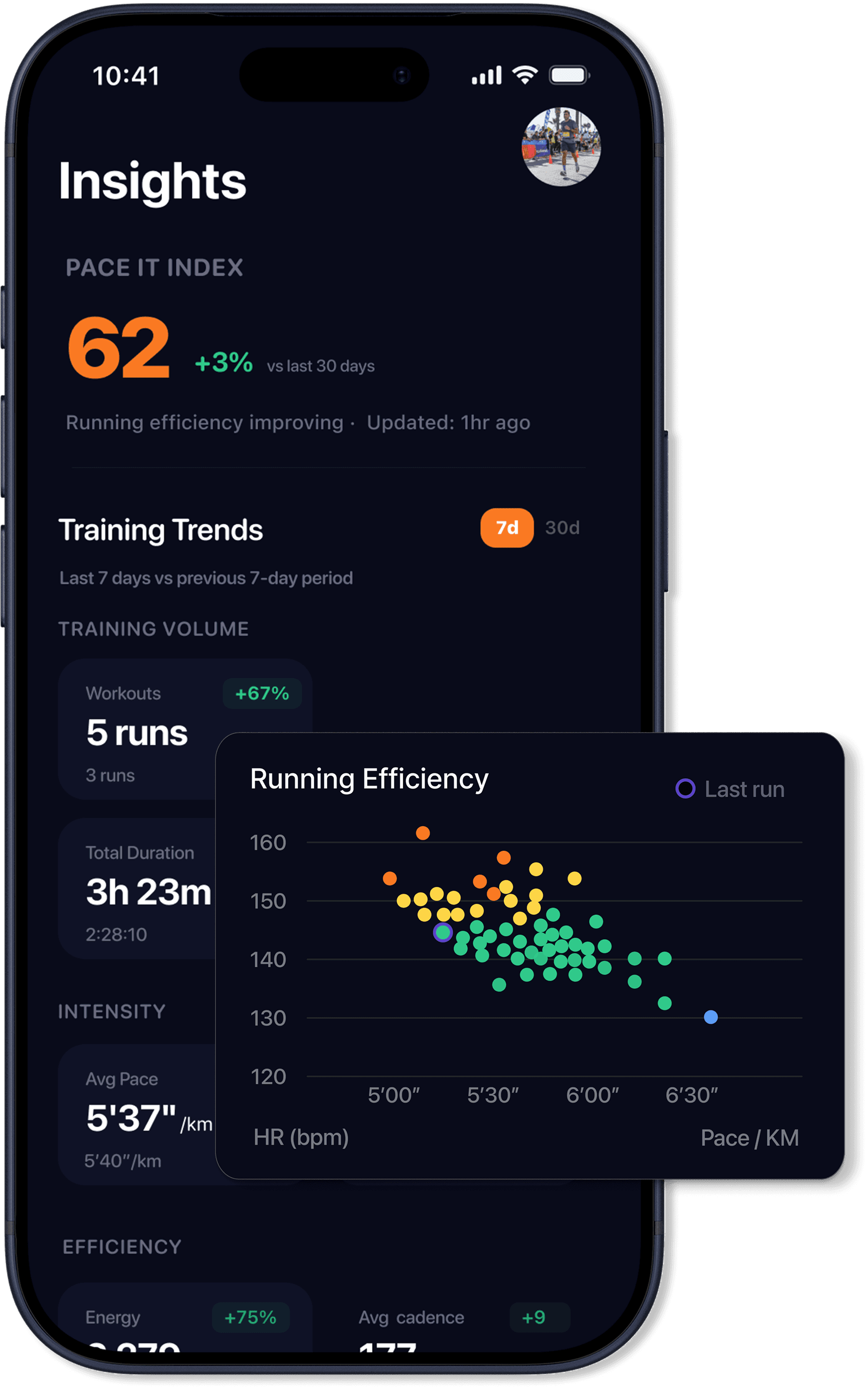
The headline number in Insights is the Pace It Index, a single 0 to 100 score with a 30-day delta. It is built from four pillars: fitness (VO2 Max), efficiency (pace relative to heart rate), consistency (how often you run), and volume (weekly distance with diminishing returns). Where VO2 Max on its own is a single-variable estimate that barely moves week to week, the Pace It Index combines what your body can do with how consistently and efficiently you are doing it. When your easy runs get faster at the same heart rate and you are running regularly, the score goes up. When you stop or regress, it decays. It reacts to real changes in your training, not a model.
The Core Insight: Pace at Effort
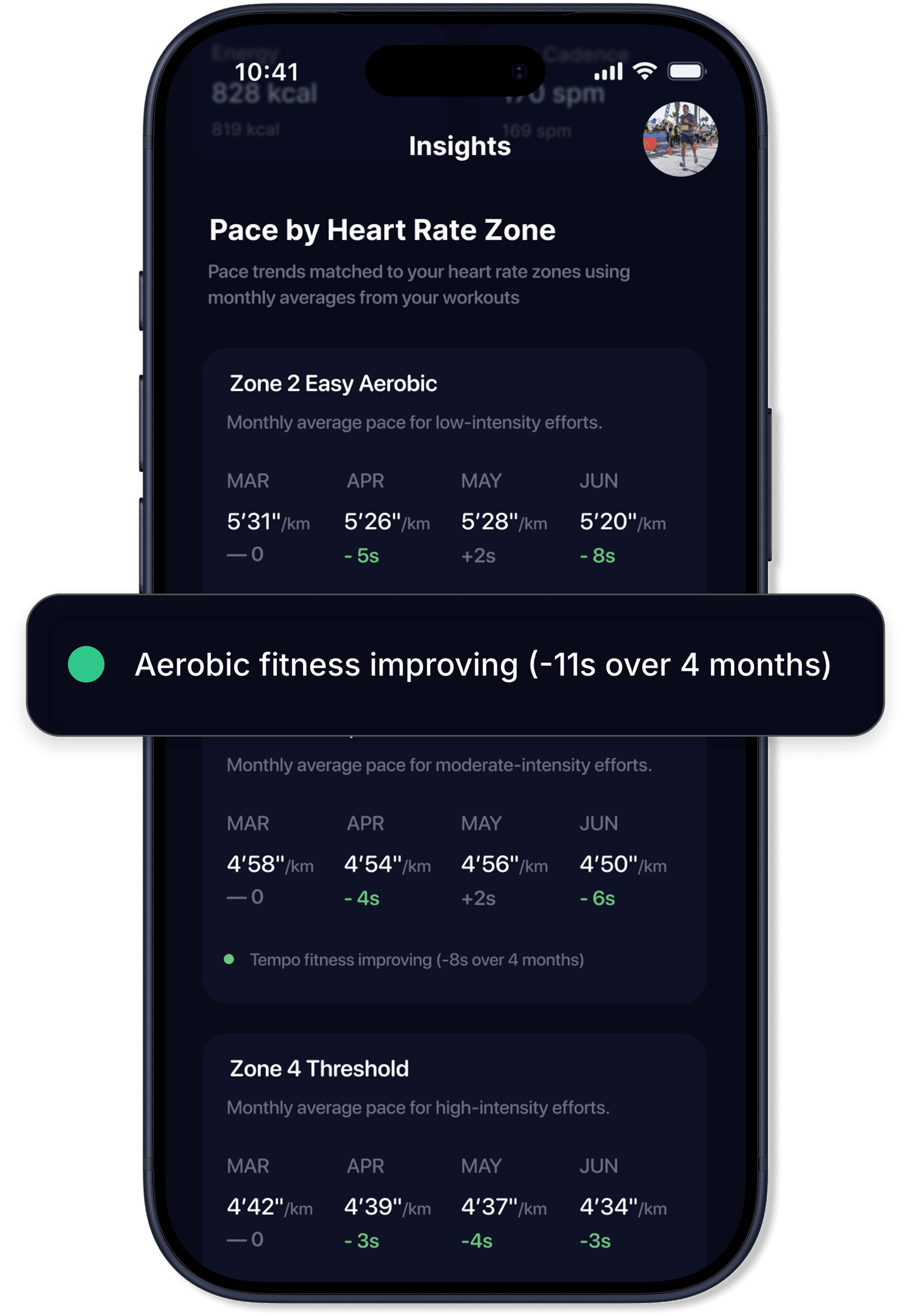
Pace It tracks your average pace in each heart rate zone, month by month, and plots it so you can see the trend. If your Zone 2 pace goes from 5:31/km in February to 5:20/km by June, your aerobic fitness genuinely improved. Same heart rate, faster pace. That single chart is the most honest fitness signal available from a watch, and it is what the app was originally built around.
Alongside that, there is a running efficiency scatter. Every run from the last 90 days is plotted as a dot with pace on one axis and average heart rate on the other, color-coded by zone, with a trend indicator showing whether your efficiency is improving, declining, or stable.
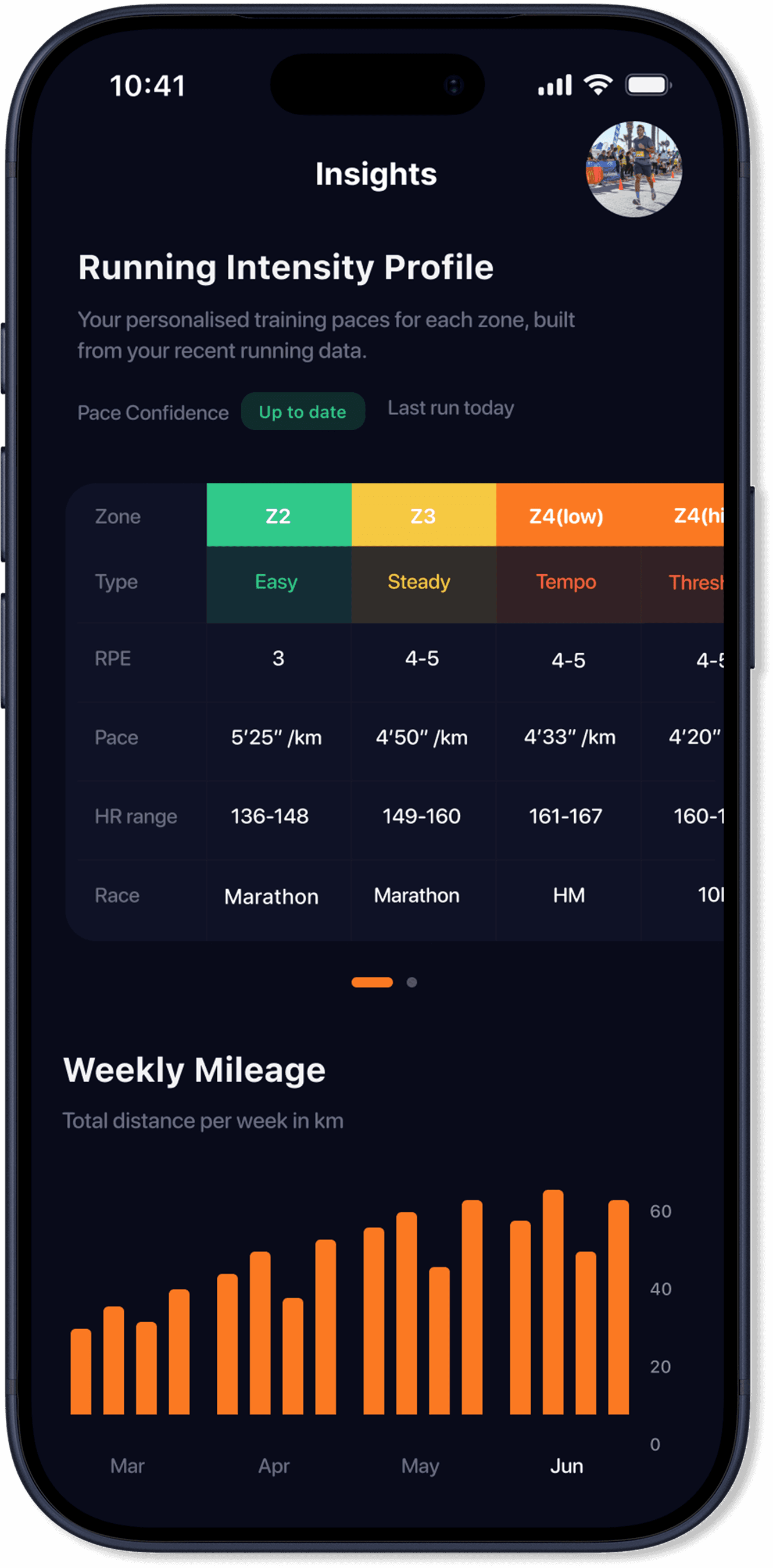
The Running Intensity Profile takes your last 60 days of running and derives seven personalized training paces, from recovery through to sprint, each tied to the heart rate zone where it sits. It also generates race time estimates for 5K, 10K, half marathon, and marathon. These are not generic calculator outputs. They are built from your own data and update as your fitness changes.
How the Analytics Work
Pace It pulls workout data from HealthKit or from Strava. It merges data from multiple sources, deduplicates overlapping workouts, and builds a unified training history over years.
During setup you configure heart rate zones and the app uses those as the foundation for everything it calculates:
- Training distribution showing the split between easy and hard running, and where your time falls across zones
- Training Load Ratio, an acute-to-chronic workload ratio that flags when you are building too fast or need to back off
- LT1/LT2 threshold estimates derived from your own pace-at-HR data, not a generic lookup table
All of this updates automatically as new workouts come in. There is no manual logging.
The Apple Watch App
Apple Watch hardware has reached the point where the sensors rival dedicated running watches. What has been missing is a running app that uses all of it and really makes sense of pace and heart rate data. Without context these metrics feel meaningless. Pace It includes a native watchOS app, built to give Apple Watch runners the kind of experience the watch sensors deserve. It offers 40+ running metrics across 5 fully customizable screens, including gauges for live targets with directional haptic feedback when you drift above or below your range.
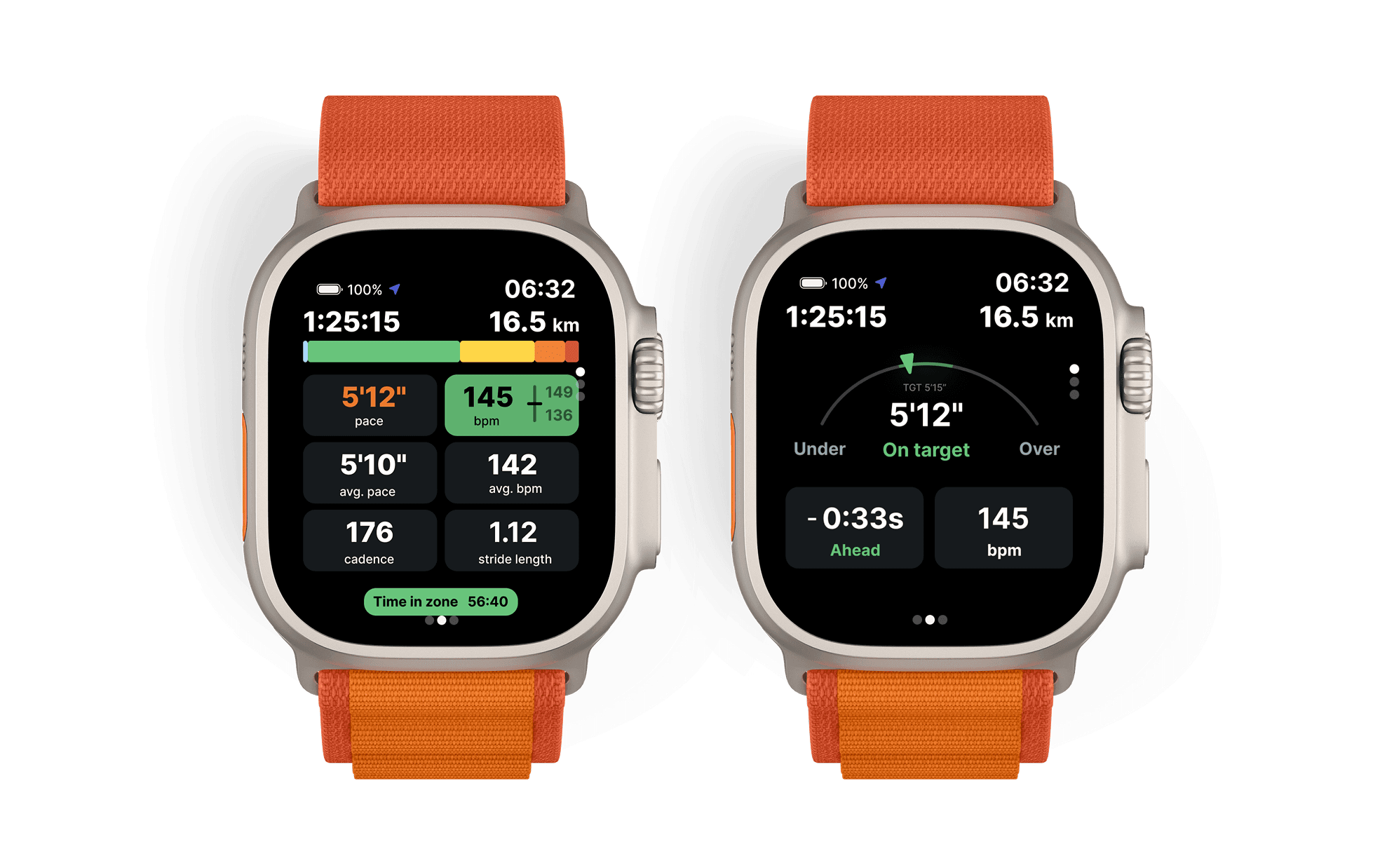
For structured training, you can build custom workouts on the iPhone and sync them to the watch: warmup, interval blocks with work and recovery steps, cooldown. The watch executes each step with auto-advance, countdown haptics in the final seconds of a recovery interval, and a preview of the next step.
Outside of workouts, the watch dashboard shows Training Load Ratio, weekly mileage, training distribution, VO2 Max trend, and last run summary.
How Pace It Sits Alongside Other Tools
Pace It is not trying to replace your current setup. It syncs runs from Strava or HealthKit and adds its own analytics layer on top. It can also upload HealthKit workouts back to Strava if you want them in both places. It is a companion, not a replacement.
What Pace It owns is the long view: pace-at-effort trends across months, personalized training paces from your own data, a highly configurable Apple Watch experience, and a clean UI that users consistently highlight. The interface is designed to surface what matters. If you care about whether your fitness is moving in the right direction, that is where Pace It sits.
What Else Pace It Covers
- Personal best tracking across 5K, 10K, half marathon, marathon, and longest run, with improvement deltas versus your second-best time
- Shoe tracking, assign shoes to runs manually or by workout type, track distance per pair with replacement warnings, and see a usage breakdown across your rotation
- Workout categorization, runs are automatically classified as easy, tempo, intervals, long run, race, and so on, with manual override
- Widgets and complications, iOS home screen widgets for weekly mileage, Pace It Index, VO2 Max trend, personal bests, training distribution, and a recent runs calendar. watchOS complications for mileage, Training Load Ratio, and distribution
Pricing and Availability
Pace It is free to download and use. The free tier includes a run diary with weekly goals, personal best tracking, workout categorization, and the Pace It Index. For deeper analytics (pace-at-effort progression, efficiency scatter, training trends, Training Load Ratio, personalized paces) and the Apple Watch workout app, there are monthly and yearly subscriptions, both with a 7-day free trial. A one-time lifetime purchase is also available. The app currently holds a 4.9 out of 5 rating on the App Store.
Things to Note
Pace It is iPhone-only. There is no Android version. If you run with a non-Apple watch, your data can still flow in via Strava.
The analytics improve with more data. Zone progression needs several months of consistent running to show meaningful trends. If you have years of HealthKit or Strava data, the app will ingest it on first setup.
It is not a social platform. It is an analytics tool for your own training.
Summary
Most runners train consistently and only find out it worked on race day. Pace It exists to change that. It turns the data your watch already collects into a clear answer: is the same effort producing faster pace than it did three months ago? If you want to see your fitness improving while you train, that is what Pace It is for.
The app is free to download on the App Store. More at paceit.app.